

Recalculating frequencies in a zone
Recalculate a whole zone or just its incompatible frequencies, adjust profiles and band plans during the recalc, undo it, and review the calculation history.
Start a recalculation
Section titled “Start a recalculation”- Open the zone selector menu and choose:
- Recalculate Incompatible Only — fix the red frequencies, leave everything valid untouched, or
- Recalculate All In Zone — recalculate everything.
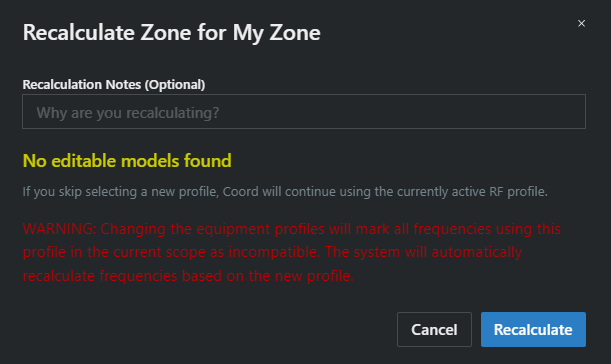
- The Recalculate Zone dialog opens:
- Recalculation Notes (Optional) — why you’re recalculating; the note lands in the calculation history.
- Band plan — Keep current band plans (no change), pick a band plan to apply, or Clear all band plans from selected frequencies.
- Change Profile — per device model, optionally swap the equipment profile before recalculating.
- Click Recalculate. A toast confirms Successfully recalculated all frequencies in zone.
When frequencies can’t be solved
Section titled “When frequencies can’t be solved”If some frequencies fail, the result dialog reports Failed to recalculate N frequencies and offers:
- Try Again — rerun, useful after freeing spectrum (disable a TV channel, remove an exclusion).
- Undo Recalculation — put everything back the way it was.
- Mark as Ignored — park the unsolvable frequencies outside the calculation. See Ignoring frequencies.
There’s also a project setting, Auto-ignore failed frequencies, that skips this dialog and marks failures ignored automatically.
The Undo Recalculation button in the zone toolbar reverts the most recent recalculation after you confirm (Undo Last Recalculation?).
The Incompatible / Ignored counters
Section titled “The Incompatible / Ignored counters”When the zone has uncoordinated frequencies, counter buttons appear in the zone toolbar — Incompatible (N) and Ignored (N) — with quick actions: Recalculate all incompatible, Recalculate all ignored, and Manually accept all (accept the frequencies as-is, taking responsibility for the conflicts). For analyzing why a frequency is incompatible, run a Health Check or see Manually analyzing incompatible frequencies.
Calculation history
Section titled “Calculation history”Zone selector menu → Calculation History opens the history for this zone — every recalculation with its date, type (Individual / Group / Zone), notes, and result. Groups have the same view scoped to the group (Recalculating a group).