

Duplicating sites
Duplicate a site to reuse its zones, groups, and frequencies — the standard way to carry a coordination to the next tour stop or event.
Duplicate a site
Section titled “Duplicate a site”- In the Site bar, click the Share Site button and choose Duplicate Site. (You can also duplicate from the Tour Planner — each site row has a Duplicate site button.)
- The dialog explains: This action will duplicate all zones, groups, and frequencies within this site. Select which optional items to include (see below).
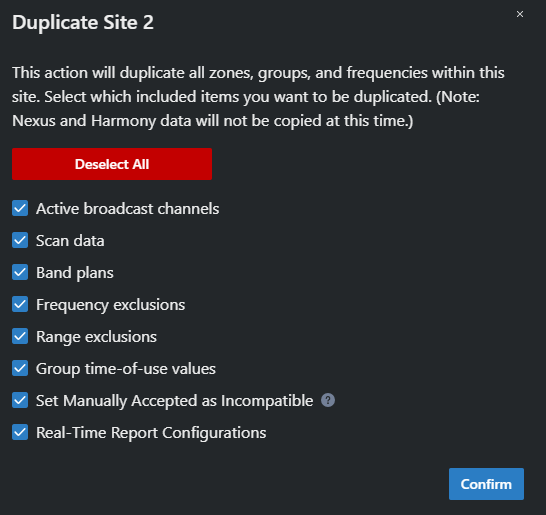
- Click Confirm.
The copy is created as Copy of your site’s name and appears in the site selector. A toast confirms Site duplicated.
What’s always copied
Section titled “What’s always copied”The duplicate always includes: the site’s location, country, time zone, notes (and the site-alert flag), calculation and plot settings, TV channel bandwidth, all zones, groups, and frequencies (including broadband and frequency-hopping devices), monitored devices and channels, monitoring tabs and layouts, and any Remote Views (renamed to stay unique, with device and tab references remapped to the copies).
Two safety changes are always applied to the copy:
- Publishing is reset. The copy gets fresh real-time report keys with publishing disabled and passwords cleared — your live report links keep pointing at the original.
- The copy starts unlocked, regardless of the original’s lock state.
Optional items
Section titled “Optional items”| Checkbox | Default | Notes |
|---|---|---|
| Active broadcast channels | on | The site’s activated TV channels |
| Scan data | on | Scan files uploaded to the site |
| Site interactions | off | The tests configured against other sites. Enabling this can invalidate frequencies in the new site, because it introduces interactions with existing sites’ frequencies. |
| Band plans | on | |
| Frequency exclusions | on | Single-frequency exclusions |
| Range exclusions | on | |
| Group time-of-use values | on | Untick to strip start/end times from all groups in the copy |
| Set Manually Accepted as Incompatible | on | Marks manually accepted frequencies incompatible in the copy so you’re prompted to recalculate them for the new environment |
| Real-Time Report Configurations | on | Report column/permission settings (links still start disabled) |
Use Select All / Deselect All to toggle everything at once.