

Marking frequencies as incompatible
Force every frequency in the zone into incompatible (red) status — the starting point for recalculating a zone from scratch.
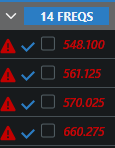
Marking frequencies incompatible tells Coord “treat these as needing new values.” They turn red in the coordination list and are picked up by Recalculate Incompatible Only — the usual next step after a venue change invalidates your plan.
Mark a whole zone
Section titled “Mark a whole zone”- Open the zone selector menu.
- Click Mark Frequencies as Incompatible.
- Confirm. The dialog warns that this marks all the zone’s frequencies as incompatible and can’t be undone — there’s no unmark action; the way back is a recalculation or manually accepting frequencies.
Other scopes
Section titled “Other scopes”- One group: group ⋮ menu → All Frequencies… → Mark All Frequencies As Incompatible.
- Single frequencies: from the frequency’s row menu, or Mark Incompatible in the plot tooltip.