

Enabling/disabling TV channels
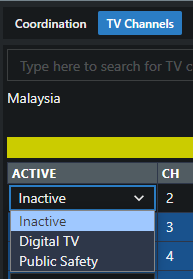
Toggle individual TV channels between Inactive, Digital TV, and Public Safety — from the channel table or straight off the plot.
Active channels are excluded from every calculation in the site — all zones share the same TV channel state. A scan of the venue tells you which auto-activated channels are actually receivable and which are safe to free up (see the worked example in Creating a new frequency coordination).
From the TV Channels table
Section titled “From the TV Channels table”- In the zone toolbar, click TV Channels.
- On the channel’s row, open the status dropdown and pick:
- Inactive — the channel is free; calculations may use it.
- Digital TV — active broadcast; excluded.
- Public Safety — excluded and shown in red; reserve these regardless of what a scan shows.
From the plot
Section titled “From the plot”Click a channel’s number in the strip below the plot (or its shaded band in the plot itself) to toggle it between active and inactive — fastest when you’re comparing channels against a scan trace.