

Excluding a frequency range
Block whole spectrum ranges across every zone in the site — entered as start/stop values, TV channel numbers, or a bulk list.
Range exclusions are site-scoped: a range you add here is avoided by calculations in every zone of the site. When a range is enabled, all calculations exclude candidates that fall inside it.
Add a range
Section titled “Add a range”- In the zone toolbar, click the Exclusion Ranges button.
The Range Exclusions modal opens for the site.
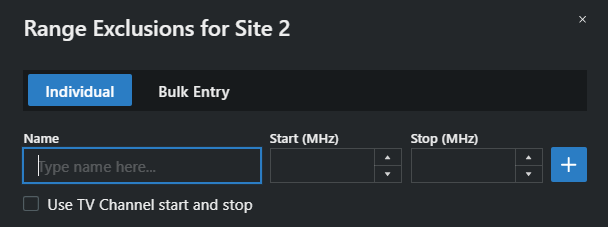
- On the Individual tab, type a Name and the start and stop frequencies in MHz, then click the + button.
- Or tick Use TV Channel start and stop to define the range by channel numbers instead — pick the Start and Stop channels from the dropdowns.
Each row in the table has an Enable checkbox, so you can keep a library of ranges and only activate the ones that apply today. Values edit in place.
Bulk entry
Section titled “Bulk entry”The Bulk Entry tab accepts many ranges at once: enter them as start-end pairs separated by commas or new lines — for example 600-650, 650-700, 700-725 — and click Save. Invalid entries are skipped and reported.
From the plot
Section titled “From the plot”Range exclusions (including TV channels, cellular bands, and land-mobile ranges) can be toggled directly on the spectrum plot: click the range’s label to flip it on or off.