

Marking frequencies as deployed
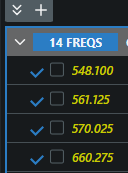
Track which frequencies are already dialed into hardware by marking them deployed — shown in yellow — zone-wide, per group, or for the whole site.
“Deployed” is a bookkeeping flag: it changes how frequencies are displayed (yellow in the coordination list), not how they calculate. Use it to keep track of what’s already been programmed into transmitters during load-in.
Mark a whole zone
Section titled “Mark a whole zone”- Open the zone selector menu.
- Click Mark Frequencies as Deployed — or Unmark Frequencies as Deployed if they’re already marked. The item’s label follows the current state.
Other scopes
Section titled “Other scopes”- One group: group ⋮ menu → All Frequencies… → Mark All Frequencies as Deployed (Managing all frequencies).
- The whole site: site selector menu → Deploy All / Undeploy All (Selecting a site).
- Single frequencies: from the frequency’s own row menu in the coordination list.