

Creating a new frequency coordination
The recommended end-to-end workflow: clear the spectrum, plan the bands, calculate device by device, then verify on the air.
1. Confirm TV channel exclusions
Section titled “1. Confirm TV channel exclusions”Start with the spectrum itself. Set the site’s location so Coord can find the local TV channels (Enabling TV channels), and upload a scan of the venue if you have one (Uploading scan files).
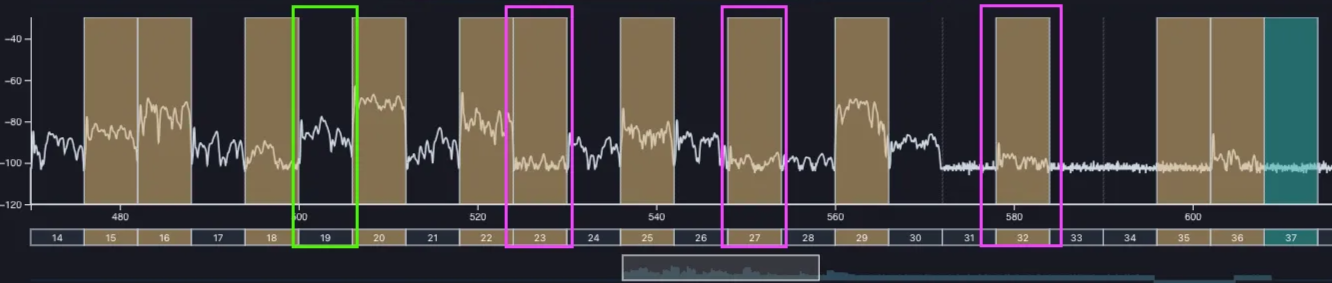
Enabled channels appear as shaded blocks on the plot — no candidates will be calculated inside them. Click a channel number below the plot (or use the TV Channels window) to toggle channels the scan shows as actually free or occupied.
2. Prepare a band plan
Section titled “2. Prepare a band plan”A band plan is your plan of execution — reserve ranges for IEMs versus mics, protect a range for a specific rig, or keep separation between departments. See Creating band plans and the concept page Band plans.
3. Calculate, starting with the most constrained device
Section titled “3. Calculate, starting with the most constrained device”Work in the Calculation area, device by device:
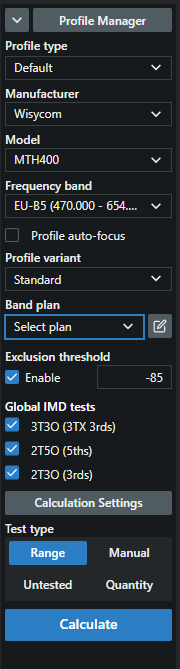
- Pick the Manufacturer, Model, and frequency Band for the first device — start with the device that has the fewest candidate frequencies (fixed-frequency systems and narrow tuning ranges before wide-tuning digital systems).
- Choose the RF profile variant if needed — tighter or looser spacing tolerances. In reasonably open spectrum, the Standard variant is right.
- Choose the Test type:
- Range — find as many frequencies as possible.
- Quantity — find a specific number.
- Untested — check a value without full testing.
- Manual — add multiple devices first, then calculate for all of them at once (the Wireless Workbench-style pattern).
- Select a Band plan for the calculation if one applies.
4. Accept candidates
Section titled “4. Accept candidates”Review the candidate list and add your picks to the selected group — or click a green candidate on the plot and choose Add. When the zone displays a scan file, each candidate shows the measured amplitude at that frequency, so you can prefer the quietest ones.
5. Repeat, then verify on the air
Section titled “5. Repeat, then verify on the air”Repeat for every device in the coordination. Then test with the real rig: walk the space, watch the monitoring view, and run a Health Check — the physical environment always gets the last word.