

Managing licenses
See your SoundBase Pro licenses and which machines hold them, free a seat, manage billing, and upgrade or buy a business license.
Open the user menu → My Settings… → Licenses in the browser version.
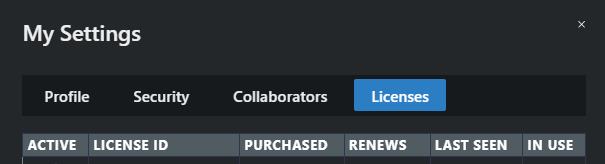
Reading the licenses table
Section titled “Reading the licenses table”One row per license, with:
| Column | Meaning |
|---|---|
| Active | Whether the license is active, and whether it renews. Hover for the exact state — active and auto-renewing, active but canceled (expires at the end of the term), or inactive |
| Machine ID | The computer currently holding the seat; hover to see its OS, memory, and CPU |
| Purchased / Renews | Start date and next renewal — or Canceled - expires … |
| Last Seen | When that machine last checked in |
| In Use | Whether the seat is currently claimed |
Empty table? No active licenses found — you’re on the free tier.
Seats: 2 computers per license
Section titled “Seats: 2 computers per license”Each SoundBase Pro license can use Pro features on two machines at a time. Signing in to SoundBase Desktop claims a seat for that computer. Signing in on a third computer still works — you keep the base product, without Pro features, until you free a seat.
To free a seat: log out of SoundBase Desktop on the machine you’re done with (user menu → Log Out). That releases its seat immediately, so another computer can use Pro features. If a machine is lost, broken, or wiped before you released it, contact support@soundbase.app.
Billing, upgrades, and business licenses
Section titled “Billing, upgrades, and business licenses”- Manage Subscription and Billing — opens your billing portal to update payment details, download invoices, or cancel.
- Upgrade to Pro — for free accounts; starts the purchase flow inside SoundBase.
- Purchase Business License — buys a multi-seat business license.
Business licenses
Section titled “Business licenses”Business-license owners get a License Manager entry in the user menu for assigning seats to their team: each row shows the Current Holder (double-click to change, searching by name or email), whether it’s in use, and its expiry — with controls to edit the expiration date (while a seat is free) or revoke a seat.