

Editing security settings
Change your password, turn on two-factor authentication, and control the idle timeout and lock screen behavior.
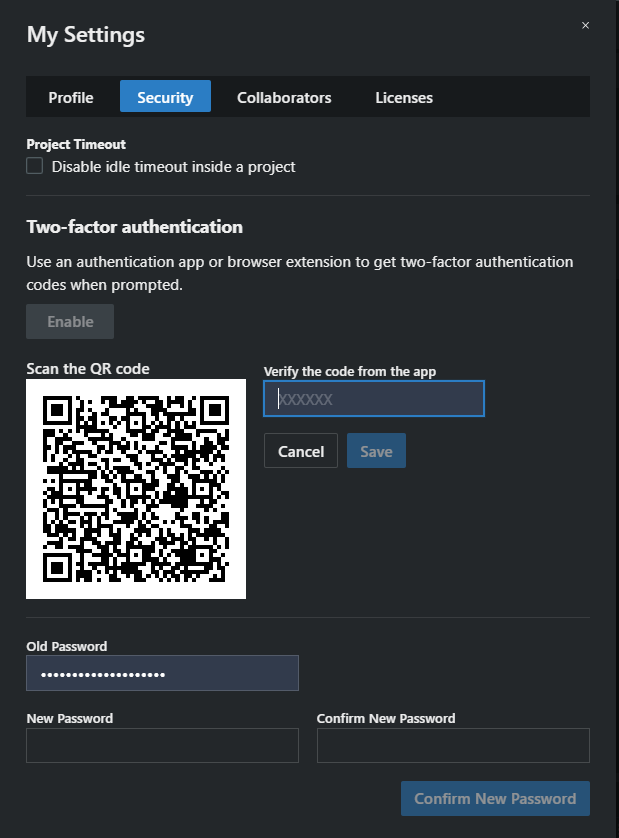
Open the user menu → My Settings… → Security.
Change your password
Section titled “Change your password”- Enter your Old Password.
- Enter the New Password and repeat it in Confirm New Password.
- Click Confirm New Password.
The button stays disabled until all three fields are filled and the two new entries match.
Two-factor authentication
Section titled “Two-factor authentication”The Two-factor authentication block shows whether it’s Configured and offers Enable or Disable. See Two-factor authentication for the full setup.
Project Timeout
Section titled “Project Timeout”Disable idle timeout inside a project stops SoundBase from timing you out while a project is open. Useful at a coordination position that sits idle for long stretches but must stay on screen — bear in mind it also means an unattended machine stays logged in.
Lock Screen
Section titled “Lock Screen”Show bouncing logo on lock screen controls the lock screen’s appearance. Lock the app anytime from the user menu’s Lock Screen item; unlocking asks for your password without ending your session.
Both settings save the moment you toggle them.
Signing out everywhere
Section titled “Signing out everywhere”If you suspect someone else has access to your account: change your password here, then use Log Out → Log Out From All Sessions in the user menu to end every active session on all your devices.